

“Bad data doesn’t announce itself. It just quietly breaks your dashboards, corrupts your models, and erodes trust in your platform — until someone finally notices.”
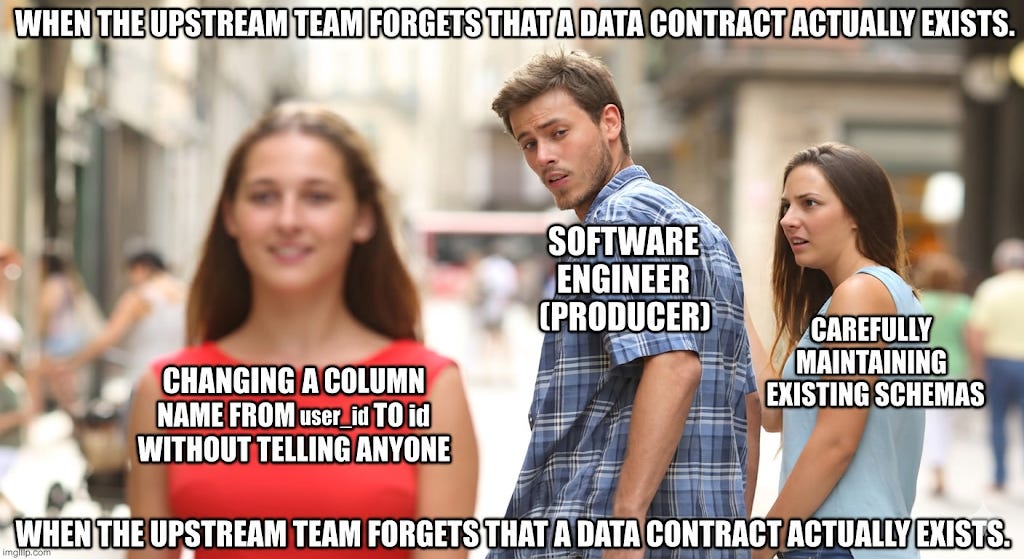
Sound familiar?
If you’ve worked in data long enough, you’ve lived this. A pipeline breaks at 2 AM. A column changes its data type without warning. A team upstream decides to rename a field — and no one tells downstream consumers. By the time the incident is resolved, three hours of analyst work is invalidated and a stakeholder has already made a decision on stale numbers.
The root cause, almost every time, is the same: no formal agreement between data producers and data consumers.
That’s what data contracts solve. According to Chad Sanderson, who pioneered data contracts at Convoy, a data contract is “an agreement between a data producer and consumer to vend a particular dataset — including schema and a mechanism of enforcement.”
In this post, we’ll break down the 6 foundational rules of data contracts — what they are, why each one matters, and how together they transform a fragile data ecosystem into a reliable one.
Why Data Contracts Exist
In most organizations, data flows like a game of telephone. Every step carries a hidden assumption — and those assumptions are the source of nearly every downstream data incident.
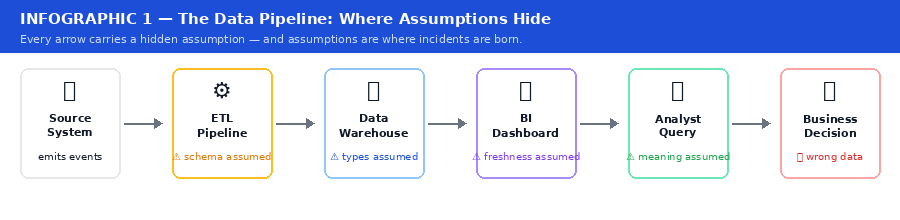
Infographic 1 — The Data Pipeline: Where Assumptions Hide
At every step, there’s an assumption — about schema, data types, update frequency, what NULL means. These assumptions are invisible. They live in someone’s head, a Slack message from six months ago, or a comment buried in a notebook no one reads.
When something breaks, you don’t just have a data problem. You have a trust problem. And trust, once lost in a data platform, is extraordinarily hard to rebuild. As Atlan’s guide puts it: “Think of a data contract like an API contract — just for data.”
The 6 Rules at a Glance
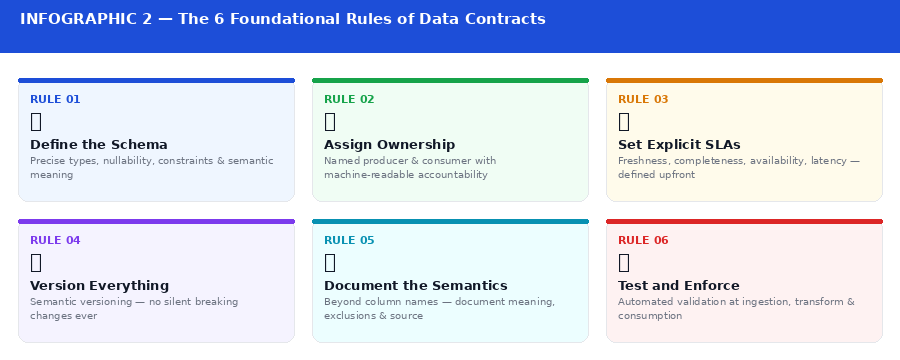
Infographic 2 — The 6 Foundational Rules of Data Contracts
Rule 1: Define the Schema, and Mean It
The first rule of a data contract is to make schema a first-class citizen. A schema is more than a list of column names. A real schema definition includes:
Field names and data types (string, integer, timestamp — not “it depends”)
Nullability — which fields are always present, which are optional
Constraints — valid ranges, allowed values, pattern matching
Semantic meaning — what does user_id refer to? Which system is it from?
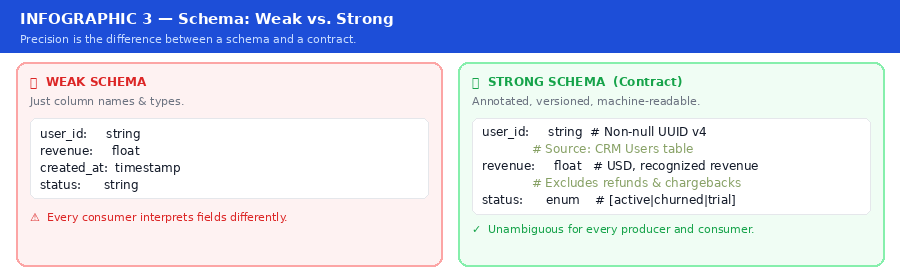
Infographic 3 — Schema: Weak vs. Strong
The difference between a weak schema and a strong one is precision. “This field is a string” is a schema. “This field is a non-null UUID v4 string referencing the Users table in the production CRM” is a contract.
When schema is loosely defined, every consumer interprets data through their own lens — and you end up with six different definitions of “active user” across six dashboards.
⚡ Rule 1 in Practice Use a schema registry or a schema definition language like Apache Avro, Protobuf, or JSON Schema and commit schemas to version control. Treat schema changes like code changes: they need review, a changelog, and backward compatibility by default. Confluent Schema Registry is widely adopted for streaming environments.
Rule 2: Ownership Must Be Unambiguous
Data contracts require two parties: a producer and a consumer. But too often, no one owns either role formally. A producer is the team or system that generates the data. A consumer is the team or system that reads it. A data contract formally assigns both.
This matters because ownership determines accountability. When something goes wrong — and it will — there needs to be a clear answer to “who do I talk to?” If the answer is “try asking in #data-help,” your contracts are theoretical at best.
Ownership also defines who has the right to change data and under what conditions. A producer cannot arbitrarily rename a field without notifying all downstream consumers. A consumer cannot expect data to exist in perpetuity without checking if the producer still intends to maintain it.
⚡ Rule 2 in Practice Every data contract should have a named owner on both the producer and consumer side — machine-readable and embedded in the contract definition itself, not buried in a wiki. Tools like DataHub and Atlan make ownership a searchable, enforceable property of every data asset.
Rule 3: Set Explicit SLAs — Not Just “It Should Be There”
Data has a shelf life. A pipeline delivering yesterday’s sales data at 6 PM is not the same as one delivering it by 7 AM. For some use cases, the difference is cosmetic. For others, it’s business-critical.
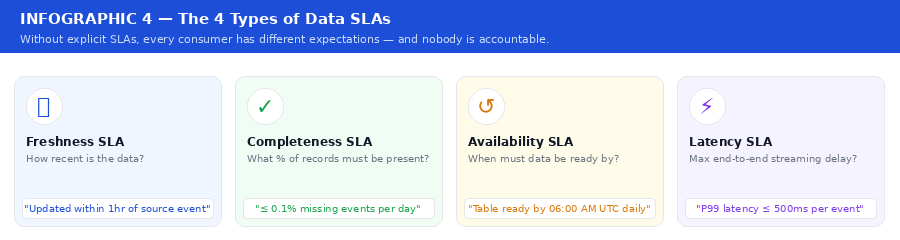
Infographic 4 — The 4 Types of Data SLAs
Without explicit SLAs, every consumer has different expectations — and nobody is accountable when those expectations aren’t met.
SLAs in a data contract must be monitored automatically. As Monte Carlo notes: “An unmonitored SLA is just a wish.”
⚡ Rule 3 in Practice Tools like Monte Carlo, Soda, or a simple dbt test suite can alert when a table hasn’t been refreshed within the contracted window. Set up dashboards that show contract health at a glance — tag monitors by contract so violations are immediately visible to the right team.
Rule 4: Version Everything, Break Nothing Silently
APIs have versioning. Software packages have versioning. Data pipelines, historically, do not — and this is one of the most underappreciated sources of data incidents.
When a producer changes a field name, removes a column, or changes a data type, every downstream consumer that relied on the old schema is now broken. In many organizations, this plays out in silence: the pipeline doesn’t error — it just returns wrong data. No alerts fire. No one notices until a report looks suspicious.
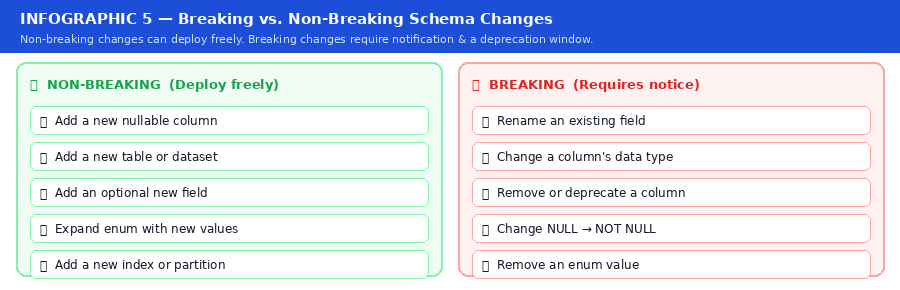
Infographic 5 — Breaking vs. Non-Breaking Schema Changes
This is the same discipline REST API designers have followed for decades. Non-breaking changes can deploy freely. Breaking changes require a deprecation window, consumer notification, and a versioned transition path.
See Secoda’s guide on implementing data contracts with dbt for wiring this into a real CI/CD pipeline.
⚡ Rule 4 in Practice Treat your data contract definitions like code. Version them in Git using semantic versioning (major.minor.patch). Automate checks that detect breaking changes in pull requests before they reach production.
Rule 5: Document the Semantics, Not Just the Syntax
A contract that says revenue: float is half a contract. The full version specifies: Total recognized revenue in USD for the order at time of invoice. Does not include refunds, chargebacks, or promotional discounts. Source: Billing Service v2. Updated on every order state change.
Semantic documentation answers questions data types cannot: What does this field mean? What business logic has been applied? What has been excluded? Which system is the source of truth? What should a consumer NOT use this field for?
This kind of documentation prevents the most insidious class of data errors: technically correct data, used incorrectly. When an analyst uses a gross_revenue field to calculate net margins because the field was never clearly labeled, no pipeline breaks — but the business makes the wrong decision.
⚡ Rule 5 in Practice Embed semantic documentation directly in the contract definition. Use a data catalog — like DataHub, Atlan, or dbt docs — to make it discoverable. Require semantic descriptions as part of your contract review process, just like you’d require docstrings in a code review.
Rule 6: Contracts Must Be Tested and Enforced
A contract that isn’t enforced is a suggestion. The final rule is that data contracts must have teeth — automated testing at every layer of the data lifecycle, from the moment data arrives to the moment it’s consumed.
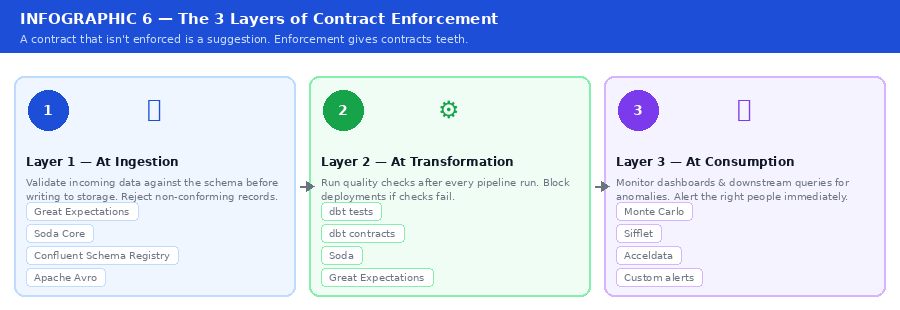
Infographic 6 — The 3 Layers of Contract Enforcement
Enforcement also means feedback loops. According to Monte Carlo’s 7 critical data contract lessons, the most successful teams treat contract violations with the same urgency as production outages.
See also: Xebia’s detailed guide on wiring dbt contract enforcement into a deployment workflow.
⚡ Rule 6 in Practice Integrate contract validation into your CI/CD pipeline. Great Expectations, Soda Core, and dbt tests are designed for exactly this. Set up alerting so that contract violations surface in the same channels your on-call team watches.
Putting It All Together
Data contracts aren’t a silver bullet. They require organizational buy-in, tooling investment, and a cultural shift — from treating data as a byproduct to treating it as a product with real consumers and real accountability.
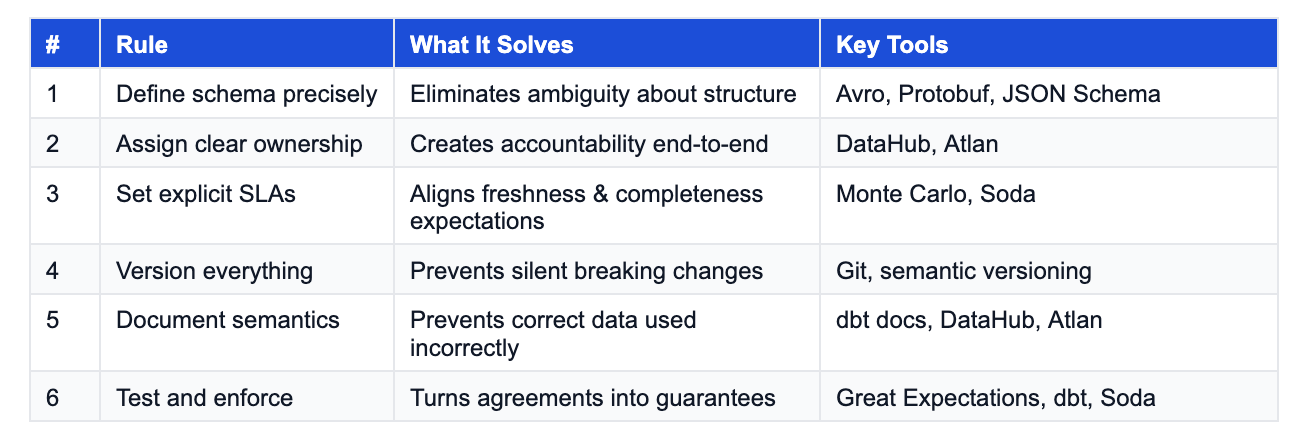
But the payoff is significant. Teams that adopt data contracts report faster incident resolution, fewer data quality surprises, and higher trust in their data platform. Here’s a summary of the six rules:
The Bottom Line
Every data pipeline is built on a set of assumptions. Data contracts are how you stop those assumptions from being invisible.
If you’re building a modern data platform and you haven’t started thinking about data contracts yet, the question isn’t whether you need them — it’s how many incidents it will take before you implement them.
Start small. Pick one critical pipeline. Define the schema formally. Assign an owner. Write down the SLA. Commit it to version control. Run one automated test against it.
That’s your first data contract. Build from there.
If you found this useful, share it with a data engineer who’s dealt with one too many “where did this column go?” incidents. Drop your thoughts in the comments.
REFERENCES & FURTHER READING
[1] Chad Sanderson — “The Rise of Data Contracts” — Data Products Substack
[2] Chad Sanderson — “An Engineer’s Guide to Data Contracts” — Data Products Substack
[3] Monte Carlo — “Data Contracts: 7 Critical Implementation Lessons”
[4] Monte Carlo — “Data Contracts: How They Work, Importance & Best Practices”
[5] Soda — “The Definitive Guide to Data Contracts”
[6] Atlan — “Data Contracts Explained: Key Aspects, Tools, Setup”
[7] Secoda — “Implementing Data Contracts with dbt and across the MDS”
[8] Xebia — “Data Contracts and Schema Enforcement with dbt”
[9] dbt Documentation — “Data Tests”
[10] DataCamp — “What Are Data Contracts? A Beginner Guide with Examples”
It’s a great article. Each data pipeline should start with a data contract. Do you think we can document a data contract in a word document and publish its link on dataset so that each consumer who wishes to consume it needs to sign it implicitly or explicitly before consuming the data ?
Timeline for Communication of breaking changes like 14 days or so should be part of data contract.
Documenting when and under what circumstances emergency release can happen needs to be documented as well.
Data contracts are necessary but not sufficient. They solve the schema problem. Producer and consumer agree on shape, freshness, ownership. That’s the foundation. But what happens after the contract is honored and the data arrives on time in the right format and the number is still wrong? That’s the gap. A contract is like a building permit. It guarantees the structure meets code. It doesn’t guarantee anyone wants to live there. Trust infrastructure verifies that what showed up is actually usable for the decision it’s feeding. Most teams stop at the contract. The ones that close the loop build something on top that connects the metric to the action it’s supposed to drive.